
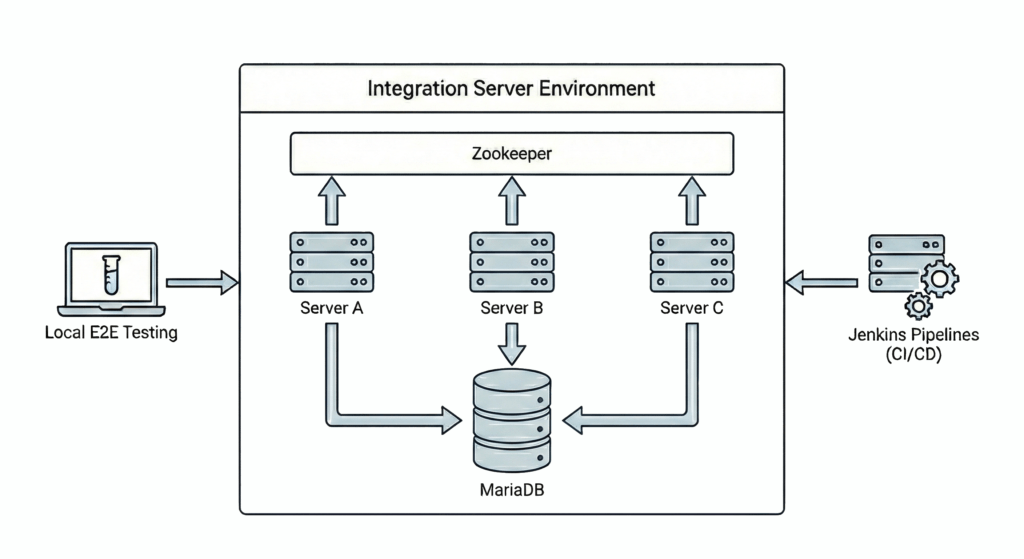
Engineering at Wealthfront is centered on the idea that code should be written to facilitate testing, not the other way around. Without a staging environment to fall back on, we maximize confidence through a sophisticated, multi-layered testing strategy. While unit tests provide our most rigorous line of defense, our Integration Server is the workhorse that handles the boundaries between large components. It is a self-contained mirror of our production stack used throughout the lifecycle: by backend devs verifying state, by frontend devs testing end-to-end flows, and by our CI/CD pipelines as the final gate. The Integration Server helps ensure that every change is fully vetted before it ever touches our production systems.
Historically, the Integration Server relied on HSQLDB because its embedded architecture allowed it to run directly within JARs and Jenkins pipelines without external dependencies, all while providing seamless JDBC support for Hibernate mappings. This provided a lightweight, zero-configuration environment for validating business logic. However, to better align our testing with the realities of production, we recently migrated to use MariaDB in Integration Server. This post details that transition, covering our migration strategy and the specific architectural hurdles we cleared along the way.
Why use MariaDB as the standard
While HSQLDB has served our Integration Server needs well, Wealthfront relies on MariaDB for production. Although both systems follow SQL standards, their divergent underlying architectures create an environmental gap. For instance, a recent feature caused full table scans in one of our Integration Server pipelines because it lacked production-standard indexes, leading to avoidable build failures.
Testing is a fundamental principle in our engineering culture, therefore achieving environmental parity between our Integration Server and production environment significantly boosts our trust in the deployed code. This transition not only helps prevent future problems but also provides other several key benefits:
- Strict Data Integrity: Unlike HSQLDB, MariaDB enforces strict data integrity regarding numeric rounding, decimal precision, and string length limits. Testing against these rules helps catch data handling errors in the earliest stages of development.
- Realistic Concurrency and Locking: HSQLDB’s architecture is built for speed and simplicity within the JVM heap. By switching to MariaDB, we gain insight into how our services handle real world concurrency, row level locking, and connection pool management.
- Performance and Optimization: Testing against the actual MariaDB Query Optimizer allows us to analyze execution plans and performance bottlenecks long before code reaches a live environment.
- Standard Ecosystem & Support: Moving to MariaDB gives us better tooling for debugging, query profiling, and database management. We also benefit from extensive community support, making it much easier to find solutions and resolve complex technical issues.
The Challenges of Migration
The integration server is essential to our development lifecycle, supporting a variety of critical functions across the organization. Transitioning such a widely used framework required us to maintain functionality across three primary use cases:
Challenge 1: Integration Test Compatibility
Our integration server hosts the vast majority of our automated integration tests. The primary hurdle was integrating MariaDB into the server’s existing architecture while maintaining support for automatic table creation and seed data population. We had to validate that all our tests remained functional, by remediating any inconsistencies that arose with this transition.
Challenge 2: Local Testing and Debugging
The integration server is frequently run as a standalone instance on engineers’ local machines to facilitate backend service testing and develop frontend end-to-end flows. Our strategy had to ensure that any new database infrastructure would be able to run across different local environments. We also needed to maintain the ability for engineers to easily query the Integration Server database for debugging purposes.
Challenge 3: CI/CD Pipeline Integration
We rely heavily on the integration server within our Jenkins pipelines to validate code changes across both our frontend and backend platforms. This helps mitigate new features or refactors introducing regressions into existing functionality. Moving to MariaDB required a configuration that could scale with our CI/CD jobs, running reliably and seamlessly without introducing infrastructure related flakes.
Implementation: Leveraging Testcontainers
To address these architectural challenges, we chose Testcontainers as the method to implement MariaDB in the Integration Server. Testcontainers use Docker to spin up a quick, disposable MariaDB instance that fits right into our Java setup. This lets us use MariaDB’s features without the headache of traditional database maintenance. Below is a simplified example of creating a MariaDB Testcontainer:
MariaDBContainer<?> mariaDB = new MariaDBContainer<>("mariadb:12.3")
  .withDatabaseName("integration_db")
  .withUsername("test_user")
  .withPassword("test_pass");Code language: HTML, XML (xml)
This decision simplified the implementation by providing the following benefits:
- Infrastructure Simplicity: Because Testcontainers manages the container lifecycle directly within our Java code, we eliminated the need for external Docker Compose files or manual startup and teardown scripts. The database starts and stops in sync with the JVM, preserving the self-contained nature of the integration server.
- Low Configuration Needs: We removed the requirement to manually install or configure MariaDB on individual engineer laptops or Jenkins agents. Since Docker is already standard across our local machines and CI/CD pipelines, the setup is entirely “plug-and-play.”
- Automated Lifecycle Management: Testcontainers utilize a specialized pair container (Ryuk) that monitors the JVM. This way the MariaDB container is wiped and removed as soon as the test suite or standalone server shuts down, preventing any orphaned containers.
The Integration Server architecture leverages a Template Method pattern, using a shared base class to centralize infrastructure management. This design facilitates a clean Separation of Concerns, where the parent class handles the entire database lifecycle while subclasses focus solely on implementing service specific business logic. Utilizing this centralized initialization sequence for our local services, we could implement Testcontainers by updating the parent class to dynamically construct JDBC URLs with the mapped host and port from an active MariaDB container, replacing legacy HSQLDB configurations. Consequently, any new services integrated into Integration Server inherit this standardized configuration by default, ensuring MariaDB remains the baseline database out-of-the-box.
Testcontainers is a great tool, but we still had to address a bit of a “container inception” snag in our CI/CD pipelines. Since some of our Jenkins agents already live inside Docker, trying to spin up MariaDB could create a Docker-in-Docker (DinD) mess, trying to run a container that is also inside a container. Our fix was Socket Mounting, we shared the host’s /var/run/docker.sock file to ‘plug’ the pipeline directly into the host’s Docker engine. This stops the pipeline from trying to manage its own private Docker environment and lets it use the host’s instead. Now when Testcontainers asks for a database it doesn’t try to build it inside itself, instead it tells the host to spin it up side-by-side as a sibling. It’s a much cleaner way to handle nested containers without the usual headaches.
Feature Flagging the Rollout
To ensure a smooth transition to MariaDB, we introduced a feature flag that acts as a safe toggle for our new database setup. Since the Integration Server already centralizes its database logic in a shared base class, we simply hooked into that initialization flow to replace our legacy HSQLDB with a dynamic MariaDB JDBC connection. Since Integration Server is primarily run via its JAR, we made this transition seamless by allowing the flag to be passed directly to the JAR command as a VM option or system property. This meant that moving from the old setup to the new Dockerized environment was as simple as adding a single flag to the existing commands used by engineers and Jenkins.
For Jenkins, we targeted the side branches of our Integration Server repos first, updating their Jenkinsfiles with the new flag for initial testing. Following a successful run on those branches, we moved forward with the final rollout to the main pipeline. This way we could independently test each CI/CD pipeline branch to confirm proper functionality with MariaDB.
Conclusion
The transition from HSQLDB to MariaDB isn’t just a database swap but a fundamental shift towards environment parity. The combination of Testcontainers and feature flags allowed us to modernize our integration server without disrupting the daily velocity of our engineering teams. By investing in the reliability of our internal tools, we ensure that our engineers can ship code with maximum confidence, knowing that if it passes in the Integration Server, it will perform in production. If solving architectural challenges like this interests you, consider joining our engineering team!
Disclosures:
Investment management and advisory services are provided by Wealthfront Advisers LLC (“Wealthfront Advisers”), an SEC-registered investment adviser, and brokerage related products are provided by Wealthfront Brokerage LLC (“Wealthfront Brokerage”), a Member of FINRA/SIPC. Financial planning tools are provided by Wealthfront Software LLC (“Wealthfront Software”).
The information contained in this communication is provided for general informational purposes only, and should not be construed as investment or tax advice. Nothing in this communication should be construed as a solicitation or offer, or recommendation, to buy or sell any security.
All investing involves risk, including the possible loss of money you invest, and past performance does not guarantee future performance. Securities investments are not bank deposits, are not bank guaranteed or FDIC-insured and may lose value. Please see our Full Disclosure for important details.
The content above represents endorsements from Wealthfront employees who are also clients of the firm. These individuals are compensated for their employment, which is a conflict of interest that may influence their endorsement. Endorsements may not be representative of the experience of other clients.
Wealthfront Advisers, Wealthfront Brokerage, and Wealthfront Software are wholly-owned subsidiaries of Wealthfront Corporation.
© 2026 Wealthfront Corporation. All rights reserved.