
Every iOS application starts as a monolith. Xcode’s default project structure places all source files, resources, and build configuration into a single module (or target, for all the iOS devs reading this). For small apps, this works fine. For a 10+ year old financial application with roughly 2,000 Swift and a handful of Objective-C files, 15 engineers spread across seven product squads, and weekly releases — it can quickly become a bottleneck.
As the app and team grew, we ran into three problems that compounded on each other:
- Merge conflicts on the project file. The Xcode project file (
.xcodeproj) is a binary-like package of UUIDs and opaque references. When multiple engineers add files in the same area of the codebase, the resulting conflicts range from a slight annoyance to an impossible mystery. - Opaque build configuration. Understanding or auditing what a target is configured to do means parsing raw XML or clicking through Xcode’s UI — neither of which produces a meaningful code review diff.
- No path to modularization. The static nature of the project file makes it extremely difficult to restructure the app into independent modules — which is the architectural change we need to improve build times, enforce code ownership, and scale development across squads.
This blog post covers how we adopted XcodeGen to solve the first two problems, and how we plan to utilize it for tackling the third: breaking our monolith into independently compilable modules.
What is XcodeGen?
XcodeGen is an open-source command-line tool that generates Xcode project files from a declarative YAML specification. Instead of maintaining a .xcodeproj file in source control, you describe your targets, schemes, dependencies, and build settings in a project.yml file, and XcodeGen produces the project file on demand.
The key properties that made it the right fit for us:
- Declarative targets: Each build target — app, test suite, framework — is defined in readable YAML with explicit source paths, dependencies, and build settings.
- Automatic source discovery: XcodeGen maps your filesystem directory structure into the Xcode project hierarchy. Adding a new
.swiftfile requires zero project file changes — if it’s in a directory that’s already declared as a source path, it’s picked up automatically. - Composable configuration: The
include:directive lets you split configuration across multiple YAML files, keeping things organized as target count grows. - Scheme management: Build schemes (which targets to build, test, profile, archive) are defined in YAML alongside the rest of the configuration.
The pipeline is simple:
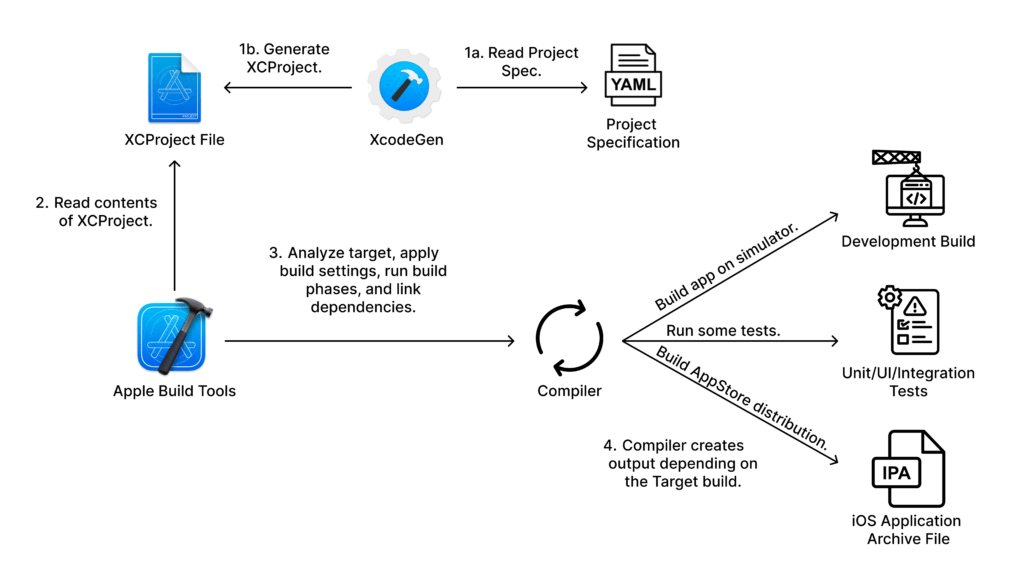
The .xcodeproj is never checked into source control. It is a build artifact, generated fresh every time.
The Quick Wins
Merge Conflicts: Eliminated
The single highest-impact change was adding two lines to .gitignore:
**/*.pbxproj
**/*.xcscheme
Code language: CSS (css)
The Xcode project file is no longer tracked in source control. It’s generated on demand by running xcodegen before each build. Seven squads can work concurrently across any part of the codebase without ever conflicting on the project file.
Build Configuration: Readable and Auditable
Previously, understanding what a target was configured to do meant opening Xcode’s Build Settings UI or parsing raw .pbxproj XML full of UUIDs. Now, every target is defined declaratively. Changes to build configuration — adding a new target, changing a build setting, adding a build script — are human-readable diffs in YAML files that can be meaningfully reviewed in a pull request.
Here’s a simplified look at what the main application target looks like in our project.yml:
targets:
  Wealthfront:
    type: application
    platform: iOS
    sources:
    - path: wealthfront-app/src
      excludes:
      - "DeveloperTools"
      - "**/*.entitlements"
    - path: wealthfront-app/DI
    - path: wealthfront-app/Startup
    - path: wealthfront-app/Experiments
    - path: common/WFFoundation/src
    - path: common/BasisMarkupLanguage
    dependencies:
    - package: WealthfrontAPIClient
    - package: Sentry
    - package: WFFoundation
    - package: WFLogger
    - package: WFRoutines
    - target: WFLoggerFramework
      embed: true
      link: true
    prebuildScripts:
    - name: Run SwiftGen
      script: '"${PODS_ROOT}/SwiftGen/bin/swiftgen" ...'
    postbuildScripts:
    - name: Optional SwiftLint
      script: '...'
Code language: YAML (yaml)
Enabling Modularization
The quick wins — no merge conflicts and readable configuration — are valuable on their own. But the real reason we invested in XcodeGen was what it enabled next: modularizing the iOS app.
Why Modularize?
By default, iOS applications are developed as a single module. All source files compile together, and every file can import every other file with no restrictions. As the codebase grows, this creates compounding problems:
- Build times scale with the entire codebase, not just the code you changed. A single-line edit can trigger recompilation of the full module depending on the effectiveness of incremental builds.
- No enforced boundaries between features. Without compile-time separation, there’s nothing preventing one part of the codebase from reaching into another. While our testing practices catch the vast majority of regressions, the lack of structural boundaries means we’re relying on discipline and test coverage rather than the compiler itself to enforce separation.
- Test isolation is impossible. Unit tests host-load the entire application, which means test suites are slow even when you’re only testing one component.
- Code ownership can be ambiguous for longstanding and shared source files. When everything is in one module, it’s not always clear who owns what.
Here are our current build times, measured on an Apple M2 Max with 64 GB of memory running macOS Tahoe 26.2:
| Target | Fresh Build | Incremental Build |
| Main App (Production) | 2 min 39 sec | 39 sec |
| Unit Tests | 2 min 11 sec | 8 sec |
| Integration / UI Tests | 2 min 47 sec | 9 sec |
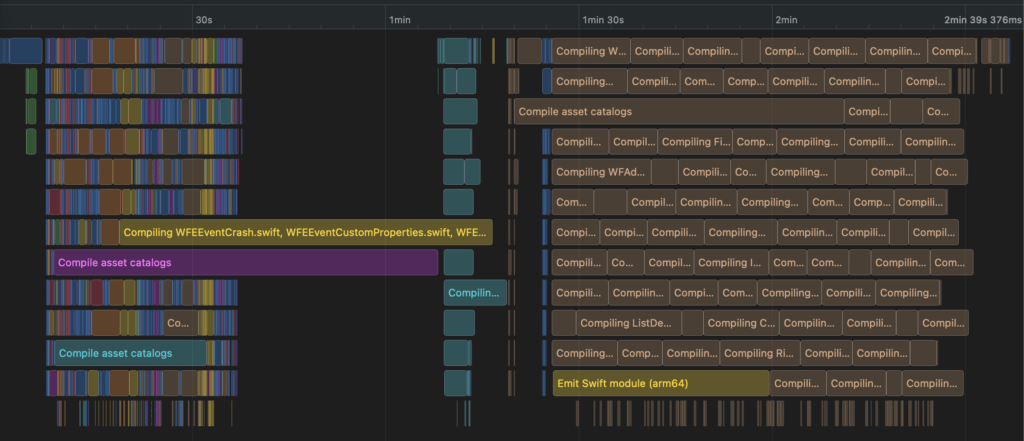
This graph shows the parallelization of build tasks during a fresh build, with overlapping bars representing concurrent compilation, linking, and code signing steps.
The fresh build times clustering around 2–3 minutes across all targets tells the story: regardless of whether you’re building the app, running unit tests, or running UI tests, the compiler processes the entire monolith. The incremental build times (8–9 seconds for tests) show the upside when the compiler can skip recompilation — that’s the target state for modularized feature code.
Two to three minutes may not seem like a lot, but when compounded across multiple product teams, engineers rebuilding dozens of times per day, and CI pipelines running on every pull request, the cost adds up quickly. Our CI pipelines currently perform fresh builds on every run to avoid failures caused by build artifact corruption — a side effect of running two package managers simultaneously as we migrate from CocoaPods to SPM — meaning they don’t benefit from incremental compilation. These times can also vary significantly depending on the hardware running the build, and not every developer or CI machine is equipped with the fastest available specs. Every additional minute spent waiting for a build is a minute of broken flow for a developer or a minute of queue time blocking a pull request from merging. Reducing build times isn’t just a nice-to-have — it’s a direct investment in engineering velocity.
A deeper look at the incremental build breakdown reveals where the time goes:
| Build Phase | Time |
| Emitting Module for Wealthfront | 14.575s |
| Planning Swift Module | 7.991s |
| Compile Wealthfront | 2.974s |
| Embed Pods Frameworks | 2.514s |
| Compile DashboardManager.swift | 1.369s |
| Link WealthfrontDev | 0.586s |
| Sign WealthfrontDev | 0.491s |
“Emitting Module” at 14.5 seconds is the dominant cost, and it scales directly with the module’s size. In a modularized architecture, a change to a leaf module would only re-emit that module — not the entire application.

The Modularization Pattern: Local Swift Packages
After evaluating vertical slice, horizontal (modular monolith), and hybrid modular architectures, we chose a hybrid approach: shared infrastructure lives in a core layer of local Swift Package Manager (SPM) packages, while feature code remains in the main app target during the transition. The app shell wires everything together through dependency injection.
Each module lives in a Modules/ directory as a standard Swift package with its own Package.swift, source files, and test targets:
Modules/
├── A11y/              # Accessibility helpers
├── WFFoundation/      # Core utilities (Calendar, Padding, etc.)
├── WFFoundationExtensions/ # API model extensions
├── WFImageResizer/    # Image processing
├── WFLogger/          # Logging infrastructure
├── WFRoutines/        # Async routine utilities
├── ...
Code language: PHP (php)
XcodeGen integrates these modules through a dedicated packages.yml file that the main project.yml includes:
packages:
  # Local modules (our code)
  WFFoundation:
    path: Modules/WFFoundation
  WFLogger:
    path: Modules/WFLogger
  WFRoutines:
    path: Modules/WFRoutines
  WFFoundationExtensions:
    path: Modules/WFFoundationExtensions

  # Remote dependencies
  WealthfrontAPIClient:
    url: ...
    exactVersion: ...
  Sentry:
    url: https://github.com/getsentry/sentry-cocoa
    from: ...
Code language: YAML (yaml)
# project.yml
include:
- packages.yml
Code language: YAML (yaml)Local modules and remote dependencies are declared in the same format, consumed by the same targets, and managed by the same tool. The include: directive keeps the configuration composable — package definitions live in one file, target and scheme definitions in another.
Each module’s Package.swift explicitly declares its own dependencies, creating compiler-enforced boundaries:
// Modules/WFLogger/Package.swift
let package = Package(
    name: "WFLogger",
    platforms: [.iOS(.v16)],
    products: [
        .library(name: "WFLogger", targets: ["WFLogger"]),
        .library(name: "WFLoggerTestSupport", targets: ["WFLoggerTestSupport"])
    ],
    dependencies: [
        .package(url: "https://github.com/getsentry/sentry-cocoa", .exact("8.57.2")),
        .package(url: "...", .exact("...")),
    ],
    targets: [
        .target(
            name: "WFLogger",
            dependencies: [
                .product(name: "Sentry", package: "sentry-cocoa"),
                .product(name: "WealthfrontAPIClient", package: "wf-ios-api-client")
            ]
        ),
        .testTarget(
            name: "WFLoggerTests",
            dependencies: ["WFLogger", "WFLoggerTestSupport"]
        )
    ]
)
Code language: Swift (swift)
The critical property: code inside WFLogger cannot import the main app. The dependency arrow is strictly one-way. If an engineer accidentally introduces a dependency on the monolith, the compiler rejects it. This is the compile-time boundary enforcement that a monolithic architecture simply cannot provide.
XcodeGen in CI and Local Development
Without XcodeGen, adding a local SPM package to a manually-managed Xcode project is fragile — it requires manipulating the project file through Xcode’s UI, and those changes produce noisy, conflict-prone diffs. With XcodeGen, adding a new module to the project is a three-step process:
- Create the package directory with a Package.swift
- Add one entry to packages.yml
- Reference the package in the relevant target’s dependencies:
XcodeGen handles the rest — generating the correct project references, build phases, and framework search paths.
Module test targets are first-class citizens. Our UnitTests scheme runs both the monolith’s test suite and every module’s test target:
schemes:
  UnitTests:
    test:
      config: Test
      targets:
      - WealthfrontTests             # Monolith tests
      - WFFoundationTest             # Module tests
      - WFFoundationExtensionsTest
      - WFImageResizerTest
      - WFRoutinesTest
      - WFLoggerTests
Code language: YAML (yaml)
When a new module is extracted, adding its test target to this list is a single line of YAML. CI picks it up automatically on the next build.
Every Jenkins pipeline in our CI system — side branch builds, main branch validation, beta distribution, App Store submission — follows the same sequence:
xcodegen → pod install → swift package resolve → xcodebuild
The Xcode project is ephemeral. It’s generated fresh on every CI run, which guarantees that CI builds and local builds produce the same project structure. There’s no “works on my machine” caused by stale project state.
For local development, we streamlined the workflow further. XcodeGen supports pre- and post-generation hooks. Our post-generation script detects whether you’re running locally (via a sentinel file created during initial setup) and automatically runs pod install, generates asset code with SwiftGen, and opens the workspace in Xcode:
FILE=~/.enable-local-xcodegen-pre-and-post-scripts

if test -f "$FILE"; then
    pod install --repo-update
    $PROJECT_ROOT/Pods/SwiftGen/bin/swiftgen config run ...
    open $PROJECT_ROOT/Wealthfront.xcworkspace
fi
Code language: Bash (bash)
On CI, this sentinel file doesn’t exist, so the hooks are no-ops — the Jenkins pipeline controls the sequence directly for finer-grained logging and error handling.
What’s Next
We’re in the early stages of app modularization. Eight modules have been extracted from the monolith — primarily infrastructure and utility code with clear boundaries and few upstream dependents. The bulk of the feature code still lives in the main app target.
The next phase is extracting the remaining core modules out of the monolith, building out the foundational layer that feature modules will eventually depend on. Once that layer is solid, each product squad’s feature area — Cash, Investing, Lending, Growth — can be built as its own module on top of these shared building blocks, with compile-time boundaries enforcing separation.
A key piece of this puzzle is dependency injection. In a modular architecture, modules need to collaborate at runtime without knowing about each other at compile time. Inspired by Guice — which powers dependency injection across Wealthfront’s backend Java services — we’ve built a lightweight, custom DI container for iOS that lets the app shell wire module implementations together while keeping modules fully decoupled. We’ll go deeper into the design and implementation of this system in a future post.
Alongside DI, we’re designing a routing layer that allows feature modules to define their own entry points while a central router orchestrates navigation between them. This will let squads develop and test their features in isolation, while the app shell composes them into the full product experience. XcodeGen scales naturally with all of this growth. New modules mean new entries in packages.yml and new test targets in the scheme configuration. The YAML stays readable as target count grows, and the include: directive can split configuration further — potentially per team — as complexity increases.
Our Android team wrote about their modularization journey back in 2020, where they achieved significant build time improvements through Gradle module splitting. We’re following a similar path on iOS, with XcodeGen serving as the enabler that Gradle’s build system provides natively on Android.
What started as a tool to eliminate merge conflicts has become the foundation for how we’ll structure the iOS app for years to come. The infrastructure is in place — declarative project management, compiler-enforced module boundaries, a DI system to bridge them, and a CI pipeline that regenerates everything from scratch on every build. Now the real work begins: breaking the monolith apart, one module at a time.
Stay tuned.
If this kind of work excites you, we’re hiring – check out our careers page to learn more about joining the team!
Disclosures:
Investment management and advisory services are provided by Wealthfront Advisers LLC (“Wealthfront Advisers”), an SEC-registered investment adviser, and brokerage related products are provided by Wealthfront Brokerage LLC (“Wealthfront Brokerage”), a Member of FINRA/SIPC. Financial planning tools are provided by Wealthfront Software LLC (“Wealthfront Software”).
The information contained in this communication is provided for general informational purposes only, and should not be construed as investment or tax advice. Nothing in this communication should be construed as a solicitation or offer, or recommendation, to buy or sell any security.
Wealthfront Advisers, Wealthfront Brokerage, and Wealthfront Software are wholly-owned subsidiaries of Wealthfront Corporation.
© 2026 Wealthfront Corporation. All rights reserved.